How to Perform a DNS Leak Test
How to Perform a DNS Leak Test: A Complete Guide to Check and Fix DNS Leaks
You might believe that your VPN is keeping all your online activity completely private, but a sneaky DNS leak could be exposing the sites you visit. Actually, even with the encrypted traffic on your device still sends hosts of DNS requests to Your Internet Service Provider (ISP) that means anybody can see your Browsing activities.
This is where a DNS leak test comes in that lets you check if your DNS queries traversing through the secured VPN tunnel or leaking on the normal path used by internet protocol. With a quick glance at your DNS servers, you can ensure your VPN works and protect your online privacy!
This guide teaches you how to run a DNS leak test, what causes a DNS leak, identifies different types of leaks, and ultimately provides steps to fix a DNS leak on your device. Perform a DNS Leak Test: A Complete Guide to Check and Fix DNS Leaks.
What Is a DNS Leak and Why Does It Matter?
The Domain Name System is akin to the internet phone book. Whenever you type in a web address like example. When you enter example. It helps your browser connect to the correct server.
Generally, if you use a VPN your DNS requests should be sent through the VPN’s encrypted tunnel and processed by the presiding AT or DNS server of your chosen VPN provider. This hides which websites you visit from your Internet Service Provider and other third parties.
If your DNS requests come outside the safe shield and are sent by accident to your ISP s DNS servers then this is what we call a DNS leak While your internet traffic can still be encrypted, that will leave behind traces of what you’re doing through your DNS queries.
How Does a DNS Leak Happen?
There are multiple technical issues that can result in DNS leaks such as network configuration or VPN settings or software and device behavior.
Incorrect VPN Configuration
Mishandled VPNs are probably the most common cause of DNS leaks. In these cases, specific VPN applications may not successfully forward DNS queries to be routed through their encrypted tunnel. During this time, your device simply continues to use the default DNS servers supplied by your ISP.
The best VPN services will also correctly route DNS requests through the VPN’s own private DNS servers; however, incorrect settings or software errors can disrupt this process.
VPN Connection Drops
If a VPN drops connection unexpectedly, your device could instantly revert back to your normal internet. VPNs are not a panacea for your privacy and security woes, but they can help thwart DNS requests escaping through your ISP servers before the VPN comes back online.
That is why most top-quality VPN services feature a kill switch which denies you an Internet connection when your encrypted VPN link goes down.
IPv6 Compatibility Issues
IPv6 is the most recent version of the Internet Protocol; since it was created to upgrade IPv4 is designed to replace IPv4. Most devices these days support IPv6, but unfortunately not all VPNs are equipped to deal with IPv6 traffic properly.
This is problematic because some VPNs only block IPv4 connections and ignore IPv6 requests, meaning your DNS queries can leak out of the VPN tunnel as an IPv6 DNS leak.
Network or System Changes
OS updates, router alterations or even manually scaled DNS settings can in some cases modify the DNS setup. These changes can put your device into using insecure DNS servers perhaps without you being aware of it.
Malware and DNS Hijacking
Some malware can change the DNS settings and direct your requests to controlled servers. In the next few ANNARCHY DOMAINS, cybercriminals hijack DNS servers to commandeer the system, routing users to pirated user association websites aimed at stealing their passwords or payment methods.
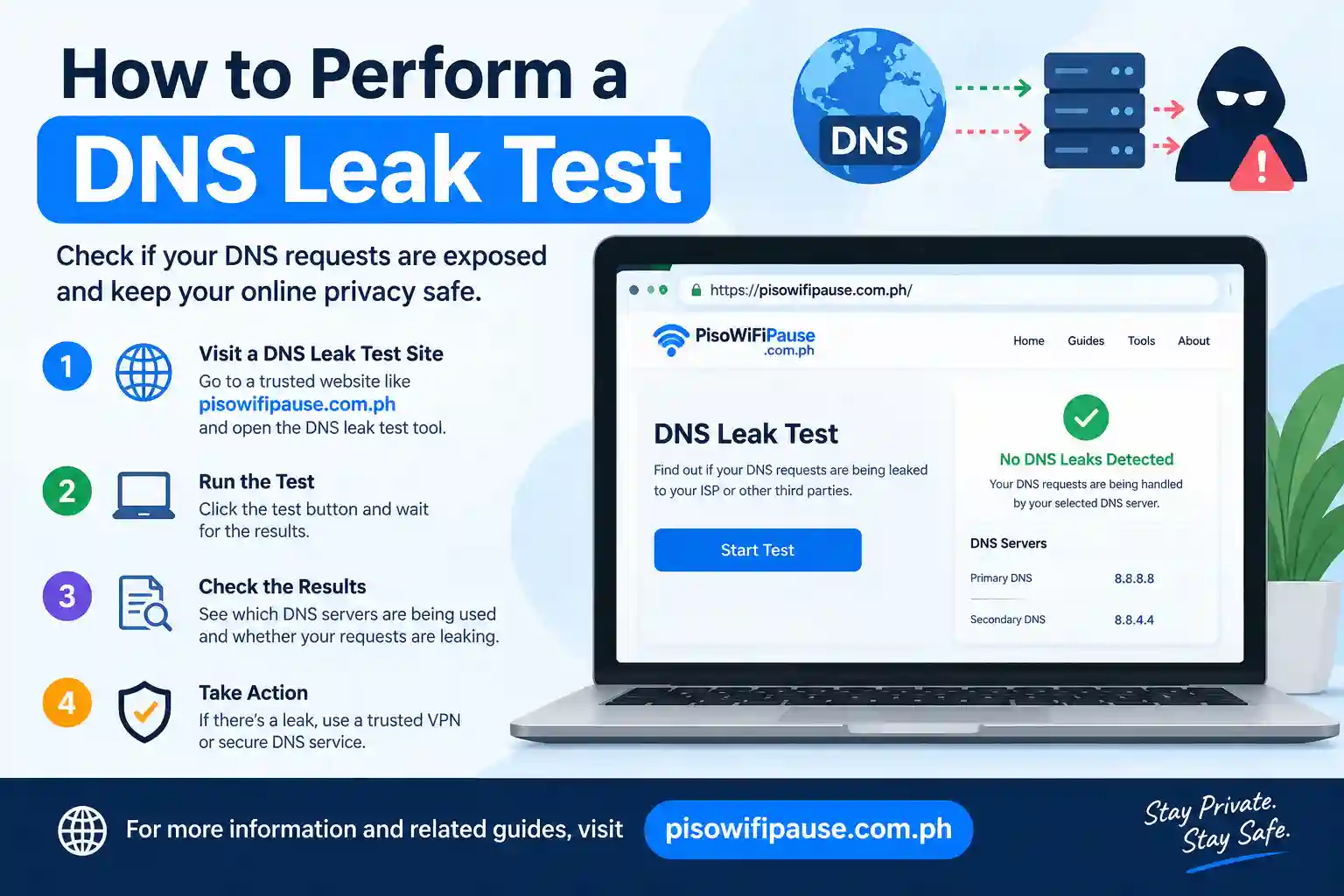
How to Perform a DNS Leak Test Step by Step
The process of checking a DNS leak is easy and does not require advanced technical skill. All you need to do is conduct a DNS leak test in just a couple of minutes using web tools.
Step 1: Disconnect VPN Connect
Disconnect your VPN and your normal DNS settings before testing. This gives a baseline and demonstrates what IP DNS servers your device is using without VPN protection.
Open your VPN client and choose the disconnect option. The network connection that you can access will then revert to the standard network configuration.
Step 2: Visit a DNS Leak Testing Website
Open up a web browser and go to a DNS leak testing site. There are a number of reliable online tools that can check your DNS requests and show you the DNS servers that your device is using.
- Examples of DNS leak testing services: DNSLeakTest. com, IPLeak. net, and DNSLeak. com.
- These sites find your DNS servers, where they are located, and who owns them.
Step 3: Conduct a Basic or Advanced Test
Now, initiate the DNS leak tests (while not connected to your VPN). ISPs usually want their DNS servers or the normal network provider in the results.
This means, for example, that if your data center is served by a local internet provider you may see DNS servers from A as results. This result provides a benchmark to compare against.
Step 4: Connect Your VPN
Next, turn on your VPN and connect to any server you want. Give it a few seconds to ensure the VPN connection is fully set up.
A VPN that is set up correctly will remove the DNS servers you used to use and substitute them (with its own secure DNS resolvers).
Step 5: Run the DNS Leak Test Again
Go back to the DNS leak testing website and do an identical test while your VPN is running.
Test against the previous test and compare the new results. In other words, your DNS servers should now be those of your VPN provider or reliable DNS service that you have set up.
If you still see your ISP’s DNS servers, this is where a DNS leak has occurred in your connection.
It could be that the trend is hard to go well with your style goals.
Just because you have a DNS leak does not mean your IP address will necessarily be exposed. What this means instead is that it directs your DNS inquiries away from the protected connection you intended to use.
How to Fix a DNS Leak and Improve Online Privacy
Should you find that your DNS leak test reveals your DNS requests, rest assured that several fixes can successfully restore the privacy safeguard system.
Enable DNS Leak Protection in Your VPN
Almost all modern VPN applications now come with a DNS leak protection feature. Open your VPN settings and turn on things like:
- “DNS Leak Protection”
- “Private DNS”
- “Secure DNS”
It routes DNS requests through the VPN tunnel as opposed to your ISP.
Use a Reliable VPN Provider
Not all VPN services take care of DNS requests as they should. A quality VPN should provide:
- Private DNS servers
- IPv6 leak protection
- Automatic DNS routing
- Kill switch functionality
A VPN with great privacy features should minimize the chance of DNS exposure.
Change Your DNS Servers
If necessary, you can manually configure secure DNS providers.
Popular public DNS services include:
Google DNS:
- 8.8.8.8
- 8.8.4.4
Cloudflare DNS:
- 1.1.1.1
- 1.0.0.1
While these services can provide better reliability and privacy, they are not a substitute for a properly configured VPN.
Disable IPv6 If Your VPN Does Not Support It
Disabling IPv6 is a safety measure because if your VPN does not support it, you may leak traffic without realising.
IPv6 can be disabled using your operating system network settings or router configuration.
Clear Your DNS Cache
Cached records, such as DNS entries remaining in your computer, can cause connectivity issues.
- On Windows, you can open Command Prompt to clean up the cache with:
- ipconfig /flushdns
- This clears any cached DNS records and forces your system to issue new DNS requests.
Why Regular DNS Leak Testing Is Important
A DNS leak test is not recommended just when you’re setting a VPN up for the first time. Regular tests ensure that your privacy tools still work after software updates, network configuration changes or VPN settings adjustments. This is a relief for those who often use public Wi-Fi networks, access sensitive accounts, work remotely or rely on VPNs to ensure their own privacy.
A VPN will only work if the entire chain of your connection is secured. A DNS leak test helps you confirm that your privacy protection is working properly.
Conclusion
One of the simplest ways to test whether your VPN is effectively masking your online activity is to check for a DNS leak. While a VPN can hide the fact that you are on the internet, a DNS leak will show which websites you are visiting when your DNS requests take another route out of the secure tunnel.
You can significantly boost your online privacy by regularly verifying your DNS servers, enabling your VPN leak protection setting, using recommended secure DNS settings and resolving setup issues. From the casual person just browsing the internet to those using VPNs for more sensitive browsing, a DNS leak test should make sure your privacy tools are doing their job. A few minutes of testing can eliminate accidental exposure and give you more confidence in your cyberdefenses.